AIDA64 Extreme
Для энтузиастов ПК. Информация о железе, бенчмарки, SensorPanel, стресс-тесты.
Подробнее →30 лет ваш ПК под контролем
Три десятилетия AIDA64 — надёжный инструмент для определения железа, стресс-тестов и мониторинга датчиков. Используется энтузиастами и IT-специалистами по всему миру.
AIDA64 в работе


Разные версии под разные задачи — от домашних энтузиастов до сетевого аудита в компании.
Для энтузиастов ПК. Информация о железе, бенчмарки, SensorPanel, стресс-тесты.
Подробнее →Для IT-специалистов. Как Extreme плюс поддержка до 2048 логических процессоров.
Подробнее →Network inventory, remote control, SQL, change tracking. Full corporate suite.
Learn more →Отдельная инвентаризация железа и ПО для компаний. Автоматизированный аудит.
Подробнее →Не уверены? Сравнить все версии
От геймеров до админов дата-центров — один инструмент, много сценариев.
Проверка температур и напряжений до и после разгона. Стресс-тест для проверки стабильности. Сравнение результатов с другими.
Документирование конфигурации, воспроизводимые бенчмарки и отчёты. SensorPanel для видео и стримов.
Удалённая инвентаризация железа, учёт лицензий, отслеживание изменений. Экспорт в SQL или CSV.
Проверка CPU, RAM, GPU и дисков перед покупкой. Быстрый стресс-тест на перегрев и стабильность.
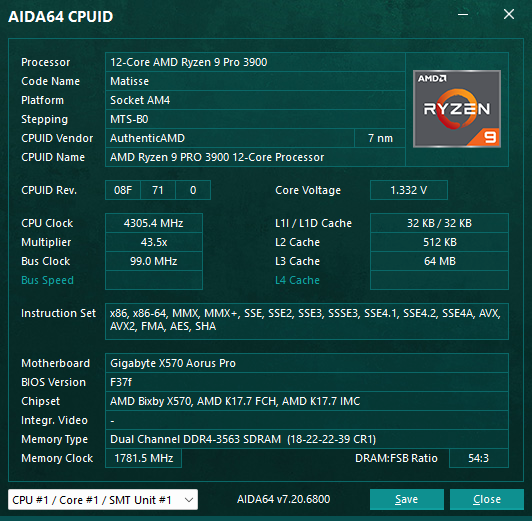
50+ pages of hardware and 50+ pages of software and Windows configuration.
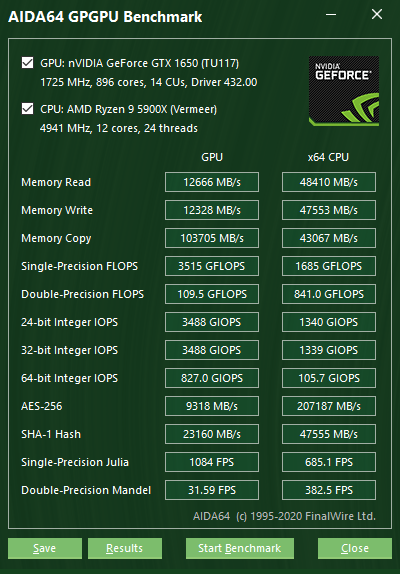
64-bit benchmarks for CPU, memory, cache, disk and GPGPU. Compare scores across systems.

Queen, PhotoWorxx, ZLib, AES, SHA3, FPU Julia/Mandel/SinJulia. Memory read/write/copy and latency. L1/L2/L3 cache bandwidth.
Linear and random read/write for SSD and HDD. OpenCL and CUDA GPGPU benchmarks for compute and crypto hashrate estimates.
Run single tests or full suite. Results export to HTML, CSV or clipboard.
OpenCL and CUDA benchmarks for GPU compute. Measure crypto hashrate (SHA-1, SHA-256, etc.) and floating-point performance. Compare GPUs across systems.
Over 250,000 entries. New CPUs, GPUs, chipsets and sensors added every release.
Intel and AMD desktop, mobile, server and embedded. Apple M-series, Qualcomm Snapdragon. Detection of cores, threads, cache, base/boost clocks.
NVIDIA, AMD, Intel GPUs. VRAM, driver version, OpenCL/CUDA support. Integrated and discrete. Laptop and desktop.
NVMe, SATA, RAID. Chipset, BIOS, ACPI. USB and Thunderbolt. Full motherboard and OEM system identification.
250+ sensor devices. Temperature, voltage, fan speed, power. Support for EC, ITE, Nuvoton, Winbond and more.
Обзор продукта
Информация о системе, тест стабильности, SensorPanel и бенчмарки — реальные экраны приложения для Windows.
Более 50 страниц конфигурации оборудования: плата, процессор, память, SPD, накопители, GPU и сведения Windows. Раскрывайте узлы дерева для полных характеристик.
Одновременная нагрузка на CPU, FPU, кэш, оперативную память и локальный диск. Мониторинг температур, троттлинга и ошибок в реальном времени.
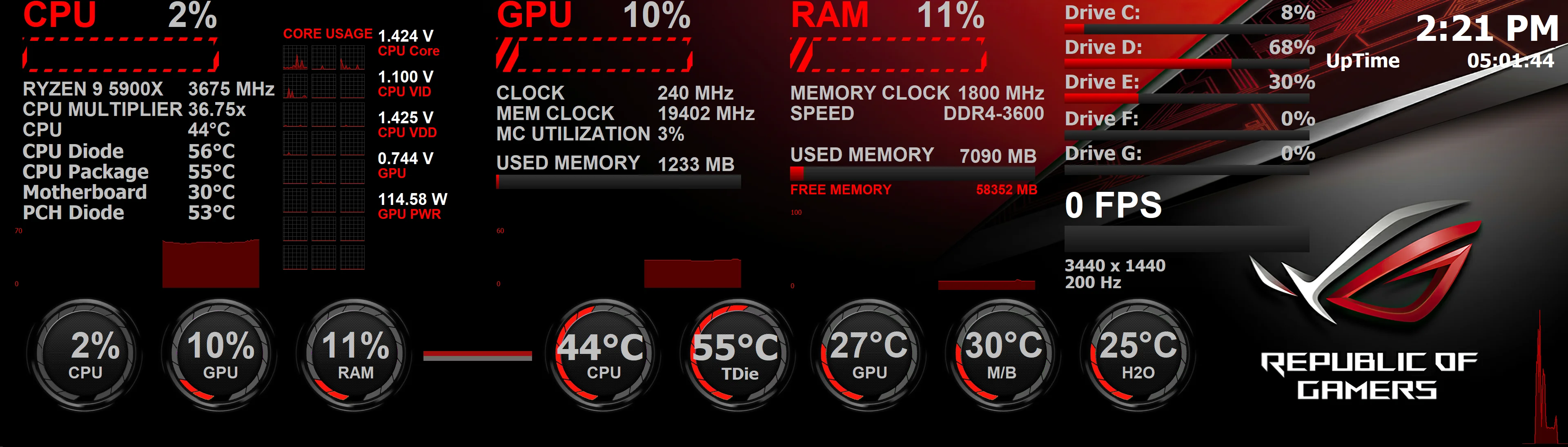
Более 250 датчиков с пользовательскими панелями — индикаторы и графики на рабочем столе, втором мониторе, внешнем LCD/VFD или смартфоне.
64-битные тесты CPU, памяти, кэша, диска и GPGPU. Сравнение OpenCL и CUDA на графике NVIDIA, AMD и Intel.
Save configuration and benchmarks in the format you need.
Accurate hardware detection, real-time monitoring and professional benchmarks.

Over 50 pages of hardware configuration and 50+ pages of software, licenses and Windows settings. Detect issues before they cause downtime.
64-bit CPU, memory, cache, disk and GPGPU benchmarks. System Stability Test drives your PC to the limit to verify overclocks and cooling.

250+ sensor devices. Build custom panels with gauges and graphs. OSD, desktop gadget, external LCD/VFD and smartphone remote monitoring.
Push your system to the limit. Toggle CPU, FPU, cache, memory and disk to isolate or combine load.
Integer and floating-point load. Validates overclock and cooling under sustained stress.
L1/L2/L3 and system RAM. Detects memory errors and thermal issues under load.
Continuous read/write to verify SSD/HDD and controller stability.
Custom panels, OSD, desktop gadget, external LCD/VFD and smartphone remote monitoring.
Business and Network Audit editions: manage many PCs from one place.
Deploy AIDA64 to workstations and servers. Collect hardware and software data remotely. View status and alerts from a central console.
Automated discovery and inventory. Track changes over time. Export to SQL for asset management and compliance reporting.
Runs on current and legacy Windows platforms.
AIDA64 does not require an internet connection for system information, benchmarks or stress testing. No telemetry or usage tracking. Your data stays on your PC.
Full localization for UI and reports. Select your language in Preferences.
English, German, French, Spanish, Italian, Portuguese, Dutch, Polish, Russian, Japanese, Korean, Chinese (Simplified & Traditional), Turkish, Hungarian, Czech, and many more.
Real experiences from enthusiasts and IT professionals.
"I use AIDA64 Extreme for every build. Stress test and sensor panel are essential. No other tool gives me this level of detail and stability."

"We switched to AIDA64 Business for network audit. Remote reporting and SQL output saved us hours. License checker and change tracking are solid."
"SensorPanel on a second screen is perfect for monitoring during benchmarks. Accurate temps and voltages. Been using it for years."
From AIDA16 to AIDA64 — constant evolution.
First version as AIDA16. DOS-based system information.
AIDA32, then AIDA64. Full Windows support and benchmarks.
SensorPanel, OSD, Business and Network Audit editions.
New CPUs, GPUs and sensors every release. 250K+ database.
No installation required. Extract and run.
Quick answers. More in Guides & FAQ.
Yes. The website and downloads are always free. Some reminders may appear in the software; a license removes them.
Depends on the license. Extreme/Engineer are per-PC. Business/Network Audit have volume options.
Windows only (x86/x64). No native Linux or macOS version.
Frequent updates for new hardware. Check Downloads for stable and beta builds.
Get more out of AIDA64.
Use Report → Quick Report and choose specific sections to keep file size small.
Enable CPU first, then FPU, then cache/memory. Watch temperatures before adding disk.
Drag the panel to another monitor for benchmarks and streaming without blocking the main view.
Low footprint. Runs on almost any Windows PC.
Pick by role and scale.
| Feature | Extreme | Engineer | Business | Network Audit |
|---|---|---|---|---|
| Hardware info & benchmarks | ✓ | ✓ | ✓ | ✓ |
| SensorPanel & stress test | ✓ | ✓ | ✓ | — |
| 2048 logical processors | — | ✓ | ✓ | ✓ |
| Network audit & remote | — | — | ✓ | ✓ |
| SQL export & change tracking | — | — | ✓ | ✓ |
Лицензии — разовая покупка, без подписки. Сравнить версии и цены или скачать пробную версию.
Все редакции бесплатны. Карта не нужна. Скачайте и сравните редакции.
Перейти к загрузкам