AIDA64 Stability Test

ガイド・FAQ・トラブルシューティング

利用のヒント、よくある不具合と対処法。

診断診断
ベンチマークとストレステストベンチマーク・ストレステスト
センサーと監視センサー・監視

User experiences & tips

Stability Test

Using AIDA64 for overclock stability

Many users run the System Stability Test after overclocking CPU or RAM. Run it for at least 30–60 minutes; if no errors or thermal throttling appear, the overclock is generally stable. Combine with sensor monitoring to watch temperatures and voltages in real time.
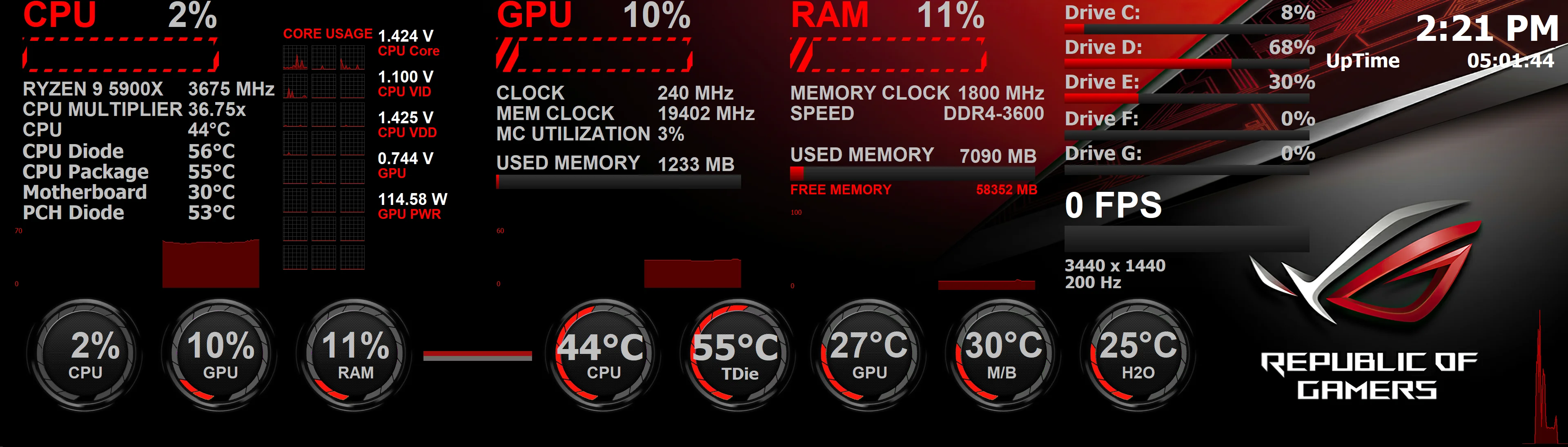

SensorPanel

SensorPanel on a second monitor

Enthusiasts often put the SensorPanel on a small secondary display or an external LCD. In Preferences → SensorPanel you can choose which monitor to use and pin the panel. Newer AIDA64 versions improve multi-display positioning stability.

Network audit

Network audit without installing on every PC

You don't need to install AIDA64 on each workstation. Put the extracted files in a network share (e.g. \\server\share\aida64) and run from logon script: \\server\share\aida64\aida64.exe /R \\server\share\reports\$HOSTNAME /AUDIT /CSV /SAFE /SILENT. Use /SAFE if some PCs lock up during audit.

AIDA64 Remote

Remote connections refused (Error 10061)

Remote control and remote report require AIDA64 running on both sides. On the remote PC, either enable "Accept Incoming Remote Connections" in the menu or launch AIDA64 with /ACCEPTBG /SAFE /SILENT from the logon script so it stays in background and accepts connections.

Troubleshooting

AIDA64 Extreme license and activation

Activation fails with EXE installer

AIDA64 saves the license in pkey.txt. If the app isn’t run as administrator, it can’t create the file. Run AIDA64 as administrator once to activate, or use the portable ZIP package and run from a folder where you have write rights.

Corsair logo

Corsair iCUE: stuttering or freezing

Corsair doesn’t yet allow third-party software to read AIO sensors at the same time as iCUE. As a workaround, in AIDA64 go to File → Preferences → Stability and disable "Corsair Hydro Platinum sensor support" and/or "Corsair Link sensor support".

Lock up at "Scanning PCI devices"

Create a file AIDA64.INI in the AIDA64 folder with:

[Generic]
LowLevelPCI=0

This disables low-level PCI scan and can avoid the lockup.

Network audit: crash or BSoD on some PCs

Use the /SAFE command-line option to disable some low-level features; often that removes the crash. For maximum safety use /SAFEST to disable all low-level features.

AIDA64

Antivirus reports AIDA64 as suspicious

FinalWire scans all distributions; they are free of malware. False positives happen because AIDA64 uses kernel-level and hardware access. Update your antivirus, and if it still flags the file you can add an exception or contact support.

Wrong or inconsistent sensor values (e.g. Aux, reversed temps)

Sensor chip layouts aren’t standardized, so "Aux" or other labels may be wrong or unused. For correction, report your AIDA64 version and motherboard model (and paste the full Sensor page) in a support forum under Hardware Monitoring.

Frequently asked questions

Does AIDA64 support Windows 10 and Windows 11?
Yes. AIDA64 supports 64-bit Windows including Windows PE, Windows 7 through 11, and Windows Server 2008 R2 through 2022.
Can I run AIDA64 from USB or without installing?
Yes. Use the ZIP (portable) package: extract to any folder, USB drive, or network share. No installation needed. Extreme and Engineer are available as EXE or ZIP; Business and Network Audit only as ZIP.
What is the difference between Extreme and Business?
Extreme is for home users: system info, diagnostics, benchmarks, SensorPanel. Business adds network audit, remote control, remote monitoring, SQL database, change tracking, and is licensed for corporate use. See comparison table.
What does "CPU" vs "CPU Diode" temperature mean?
"CPU" is usually the temperature near the CPU socket (motherboard). "CPU Diode" is the temperature of the CPU die (core). Diode is typically the one to watch for throttling and overclocking.
Safe CPU and GPU temperatures?
CPUs: best under 70°C, usually safe under 80–90°C; modern Intel CPUs throttle and can shut down to protect themselves. Motherboards: under 50°C ideal. GPUs: can go to 100–110°C with driver protection. HDDs: best under 50°C, not guaranteed above 60°C.
Does AIDA64 collect location data?
No. AIDA64 does not collect or use location data. It may query Wi‑Fi SSIDs for network info; Windows can then log that under Location Services. That’s a Windows behavior, not AIDA64 requesting location.
How to start AIDA64 at login with a delay?
Enable "Load AIDA64 at Windows startup" in Preferences → General, start AIDA64 so it creates the task, then open Task Scheduler, find the AIDA64 AutoStart task, export it, edit the trigger to add a delay (e.g. 5 minutes), import the modified task, disable AutoStart in AIDA64 so only the delayed task runs.

その他のヘルプ

上記のFAQ・トラブルシューティングでよくある問題をご確認ください。

ダウンロード